Sub-accounts explained: keeping every client’s data separate
What data isolation means in practice, and how agencies and multi-branch businesses structure client workspaces in separate sub-accounts.
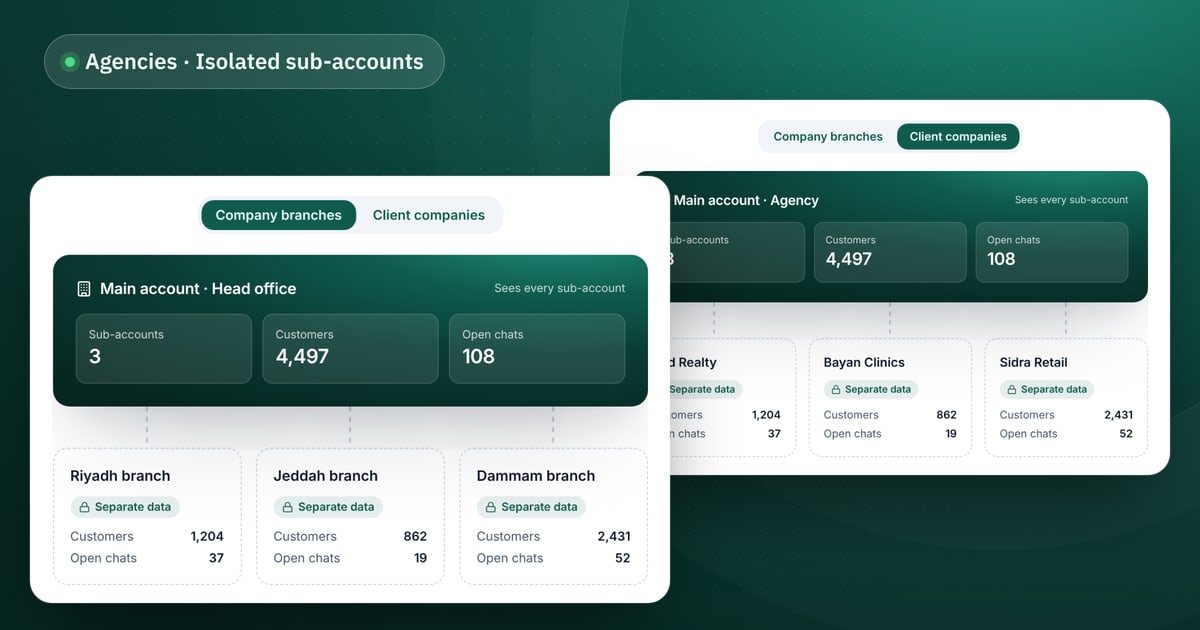
- A sub-account is a separate workspace with its own contacts, conversations and team inside one main account.
- Isolation protects data privacy and stops messages going to the wrong client.
- Give each client or branch its own sub-account instead of relying on tags inside one shared account.
- Give every member the least access their job needs.
1What is a sub-account?
A sub-account is a self-contained workspace inside your main account. Each one has its own contacts, conversations, sales pipeline, automations, reports and team. You or your agency manage them all from one control panel without one client’s data mixing with another’s.
2What isolation means in practice
When we say sub-accounts are “isolated”, we mean each of the following is kept separate from one account to the next:
- Contacts, leads and their activity history.
- Conversations on WhatsApp, Instagram, Messenger, email and chat.
- Pipelines, stages and deal values.
- Automation rules and templates.
- Reports and dashboards.
- Team members and their permissions.
At agency level you keep an agency dashboard, billing per account and audit logs showing who did what.
4Two ways to structure your accounts
- Agency or service provider: one sub-account per client. Agency staff see what concerns them, and every client stays in its own space.
- Multi-branch business: one sub-account per branch or city, while the general manager sees the full picture from the main account.
5A practical setup checklist
- Adopt a fixed naming rule such as “Client name — City” so any account is easy to find.
- Define roles: who manages the account, who answers conversations, and who only views reports.
- Grant the least access possible and add more when needed, not the other way round.
- Give every staff member a personal login and never share passwords, so the audit log stays meaningful.
- Plan the offboarding steps: who hands over the data, when the account closes, and who removes your team’s access.
6Example: a marketing agency with three clients
An agency runs campaigns for three clients: a restaurant, a beauty centre and a real-estate office. Instead of one crowded account, it creates three sub-accounts:
- The restaurant’s account: booking and order conversations, the restaurant’s own WhatsApp number, and automations that confirm bookings.
- The beauty centre’s account: an appointment calendar, reminder rules, and only the reception team.
- The real-estate account: a pipeline with viewing and negotiation stages, and the office’s own sales team.
The agency manager sees the overall picture from the agency dashboard, while the beauty centre’s receptionist sees nothing from the restaurant or the real-estate office. If the restaurant ends the contract, its space is independent and easy to close and hand over without touching another client.
7Privacy and data protection
Customer data is usually personal data, and Saudi Arabia has a Personal Data Protection Law that places obligations on those who collect and process it. Separating accounts is a technical step that helps you comply, but it does not replace reviewing your legal obligations with a qualified adviser. This article is general information, not legal advice.
8Common mistakes
- Putting every client in one account and separating them with tags alone.
- Sharing a single login between several staff members.
- Using one WhatsApp number for different clients, so conversations get mixed.
- Leaving a former employee’s access open after they leave.
?Frequently asked questions
Can one client see another client’s data?
No, provided each client has its own sub-account and permissions are set correctly. Each space is independent of the others.
Can one employee work in more than one account?
Yes, according to the permissions you give them in each account, and their activity shows in the audit log.
How many sub-accounts do I need?
One per client for an agency, or one per branch for a multi-branch business. Message us on WhatsApp and we will help you choose the right plan.